 Kim Boender
 AI
OpenAI Codex: The AI That Actually Writes Code While You Sleep
Kim Boender
What if you could describe a feature in plain English, walk away to make coffee, and come back to a working pull request waiting for your review?
That is not a fantasy anymore. That is OpenAI Codex, and it is shipping code right now.
What Is Codex, Exactly?
Codex is OpenAI's AI coding agent. Not a fancy autocomplete tool. Not a smarter IntelliSense. An actual agent that takes a task, opens your codebase, thinks through it, writes the code, runs tests, and prepares a commit, all without you babysitting it.
It lives inside a dedicated macOS app, and it connects directly to your GitHub repositories. You give it a task, it gets to work. You can watch it think in real time, or just check back later. Either way, it treats your repo like a real developer would.
The big thing that makes Codex different from, say, GitHub Copilot or Cursor is the level of autonomy. Those tools are great at helping you write code faster. Codex is trying to handle whole tasks on its own. Think "implement dark mode" or "migrate this endpoint to the new auth system," not "finish this line for me."

How the Interface Works
The Codex app is clean. You have a sidebar with your workspaces and past threads, a main chat area where you type your task, and a live diff view on the right showing what changed. It looks a lot like a stripped-down IDE, except instead of you writing the code, the AI does.
You can type something like "Create a compelling hero section for the new landing page," and Codex will reason through it, explore the relevant files, make the changes, and show you exactly what it touched. Green lines added, red lines removed. The same format you see in any good code review.
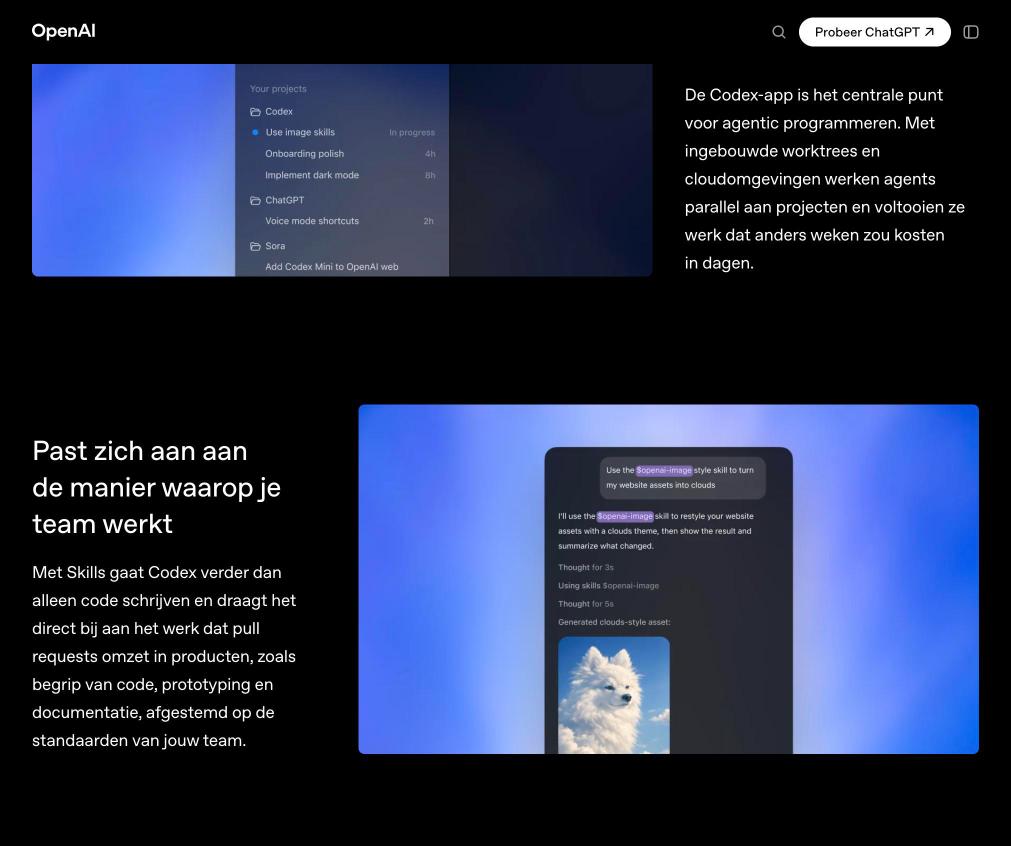
There is also an "Automations" section for recurring tasks and a "Skills" panel where you can configure custom abilities for your team, things like using your internal image generation tools or following your specific coding conventions.
What It Is Actually Good At
Here is where I will be honest. Codex works best on well-scoped tasks. "Add dark mode support across the app" is a great prompt. "Rewrite our entire backend" is not, at least not in one shot.
It is excellent at the kind of work that is important but slow: writing tests, doing refactors, updating documentation, creating boilerplate, migrating APIs. The stuff developers know needs to happen but always gets pushed to the next sprint. Codex does not mind boring work. That is a feature, not a bug.
Multiple agents can work in parallel too, each in its own sandboxed environment. So you can have one agent working on the auth migration while another handles the new settings page. That is genuinely useful for teams with a long backlog.
Where It Fits in Your Workflow
I think the most accurate mental model is: Codex is your async developer. You do not pair-program with it. You hand it a well-defined task, it goes off and does it, and you review the output like you would any pull request.
That means the quality of your prompts matters a lot. Vague instructions get vague results. The more context you give, the better Codex performs. Treat it like onboarding a new team member. You would not tell a new hire "make the app better." Give it specifics.
For solo developers, it is a multiplier. For teams, it is basically a way to staff up without hiring. I can see why companies like Cisco, Instacart, and Duolingo are already using it.
Was this helpful?
Frequently Asked Questions
What is OpenAI Codex? +
Codex is an AI coding agent from OpenAI that can take plain-language tasks and complete them as full code changes in your repository. It is not just autocomplete. It can plan, write, test, and commit code on its own.
Is Codex the same as GitHub Copilot? +
No. GitHub Copilot is powered by an older version of the Codex model and works as an inline suggestion tool. The new Codex app is a full agentic product that works autonomously on larger tasks.
What programming languages does Codex support? +
Codex works with most popular programming languages including Python, JavaScript, TypeScript, Go, Rust, Ruby, and more. It is not limited to any specific stack.
Can Codex make mistakes? +
Yes. It is still AI, and it can miss edge cases, misunderstand a requirement, or produce code that looks right but has subtle bugs. Always review the diff before merging. Think of it as a capable junior developer, not a senior engineer who needs zero oversight.
How much does Codex cost? +
Codex is available on OpenAI's Free and Go plans, with higher usage limits on paid tiers. Pricing details are on the OpenAI website and have changed a few times since launch, so check there for the latest.
Is Codex better than Cursor or GitHub Copilot? +
It depends on what you want. For inline, in-context suggestions while you code, Cursor and Copilot are still great. For fully autonomous, async task completion, Codex is in a different category. They are not really competing for the same use case.